SaaSify Widget: Manage the Complete Cloud Deal on the Salesforce Opportunity

By Shweta RaoOct 6, 2026 · 6 min read

TL;DR:

The SaaSify Widget gives you a single, opportunity-level view of co-sell activity, marketplace offers, funding, and next steps on the Salesforce record. From the same view, you can initiate a co-sell opportunity, offer, or funding request and open the relevant SaaSify module when you need more detail.

It keeps the cloud deal visible where you already work, reducing context switching and making the next action easier to identify.

Your Salesforce opportunity shows only part of the deal

You work the opportunity in Salesforce, but the information needed to move it forward is often split across SaaSify modules. Co-sell status, marketplace offers, funding, and next steps may all sit in different places.

So, when you need to answer a basic question “Where does this deal stand?” you have to leave the opportunity, open SaaSify, and navigate multiple modules to rebuild the full picture. This context switching slows execution and makes important actions easier to overlook.

The SaaSify Widget is designed to give you a 10-second view of the cloud deal from the Salesforce opportunity, so you can see what has happened, what needs attention, and what to do next.

See the complete cloud deal without leaving Salesforce.

See how the SaaSify Widget brings co-sell, marketplace offers, funding, and next steps into one opportunity-level view. Book a demo.

What the SaaSify Widget does

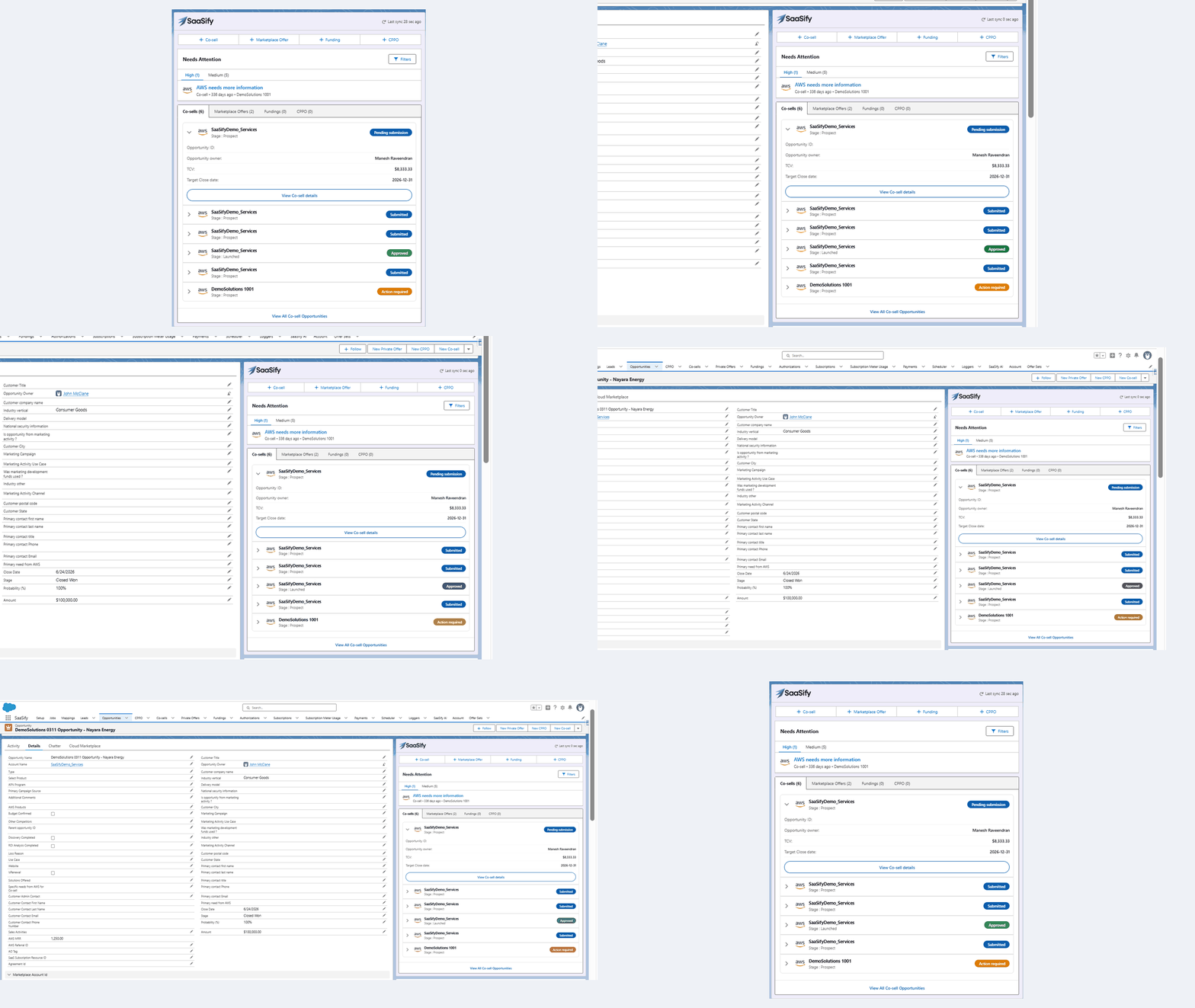
The SaaSify Widget is a panel embedded on the Salesforce record page. It uses the current record context to bring together the SaaSify information associated with that specific opportunity.

Instead of opening separate modules to review co-sell, marketplace offers, and funding, you can see the connected activity while working on the record.

The widget gives the sales team four core capabilities:

  • See the connected deal: Review co-sell activity, marketplace offers, and funding associated with the record.

  • Review next steps: See actions that require follow-up in the Need Attention section.

  • Start key actions: Initiate a co-sell opportunity, marketplace offer, or funding request from the record.

  • Open the relevant detail: Move directly to the appropriate SaaSify detail page when you need more information.

saasify cosell widget

The widget is designed for the individual record you are working on. It does not replace pipeline dashboards or executive reporting. It gives you the cloud marketplace context needed to understand and progress a specific opportunity.

Business impact: How the SaaSify Widget improves sales execution

The value of the Widget does not come from putting more data on the record. It comes from giving you a quickly scannable view of the cloud deal and making common actions available where you already work.

Faster deal execution

Cloud marketplace deals often depend on several connected actions. You may need to:

  • Register or update a co-sell opportunity

  • Create a private offer before your customer can transact

  • Request funding early enough to support a proof of concept or another sales activity

When these actions sit in separate workflows, you first have to determine what has already happened, what is still pending, and where to go next.

The Widget shortens this path. You can review the connected status of the opportunity and initiate the next action directly from the Salesforce record. It also keeps you in the context of the opportunity instead of forcing you to switch between the CRM and several SaaSify workflows. This reduces the gap between identifying what the deal needs and acting on it.

Fewer missed offers and deadlines

Marketplace workflows often include time-sensitive events. An offer may be approaching its expiry date, a co-sell action may be waiting for a response, or a funding opportunity may be available but not yet initiated.

Co-sell, marketplace offers, and funding may all influence the same opportunity, but they are often reviewed as separate workflows.

The Widget brings the available activity together on the record. You can review the current co-sell next steps, scan the offer and funding cards, and open the relevant module when follow-up is required.

This can help you reduce avoidable revenue leakage caused by:

  • Delayed actions

  • Expired marketplace offers

  • Missed co-sell follow-ups

  • Funding opportunities that were never pursued

Higher adoption and better deal visibility

Marketplace workflows are harder to scale when representatives have to leave Salesforce, locate the right SaaSify module, and navigate a separate process for every action.

The Unified Widget places these workflows directly on the opportunity. Representatives encounter co-sell, marketplace offers, and funding while working on active deals rather than having to remember to open another system.

It also gives representatives and managers an opportunity-level view of how the supporting cloud activity is progressing. Instead of reconstructing the context across modules, deal reviews can focus on questions such as:

  • Is there an outstanding co-sell next step?

  • Has a marketplace offer been created?

  • Is funding activity associated with the opportunity?

  • Which SaaSify workflow needs further action?

This makes cloud marketplace workflows easier to incorporate into the wider sales process without requiring every representative to become an expert in each underlying workflow.


Native Salesforce vs Salesforce with SaaSify Widget

Salesforce list views, reports, and dashboards are designed to organise records and analyse pipeline. The Widget serves a different purpose: it brings multiple SaaSify workflows into one working view for the specific opportunity you are managing.

When you are working on a cloud deal

Salesforce without the Widget

Salesforce with the SaaSify Widget

Type of view

Review records or lists within individual Salesforce objects

Review connected SaaSify activity across modules for one opportunity

Scope

Analyse pipeline or groups of records through reports and list views

Work on the specific opportunity currently open

Identifying what needs attention

Check each workflow and determine the priority manually

Review surfaced actions linked to the opportunity

Creating a co-sell opportunity, offer, or funding request

Leave the record and navigate to the relevant workflow

Initiate the action from the Salesforce record

Returning to an inactive deal

Reconstruct the latest marketplace activity across modules

Review the current cloud deal status in one place

Accessing detailed information

Search for and open the relevant SaaSify module

Move to the full SaaSify record in one click

Enabling your wider sales team

Train representatives to navigate several tools and processes

Embed marketplace workflows in the CRM your team already uses

The widget is designed to feel like part of the Salesforce Lightning experience rather than a separate application that representatives must open independently.

For supported implementations, Salesforce administrators can change its position on the record page, configure it around the existing Salesforce setup, or disable it where it is not required.

The foundation for AI-led cloud selling

The Unified Widget already provides a connected deal view, creation actions, and initial attention signals. Its longer-term strategic value is that it creates a Salesforce surface where richer guidance and connected actions can be delivered as the experience evolves.

Over time, this could support:

  • AI-led next steps that recommend the most relevant action

  • Buying signals that help representatives prioritize accounts

  • Coordinated workflows that connect co-sell, funding, and marketplace offers as parts of one sales motion.

Manage the whole cloud deal from the record with SaaSify’s Widget

Cloud marketplace selling involves several moving parts. Your sales team should not have to assemble them manually every time an opportunity is opened.

The SaaSify Widget brings co-sell activity, marketplace offers, funding, and pending actions together on the Salesforce record. Representatives can understand the deal, act on it, and move into the full SaaSify workflow only when more detail is required.

Already using SaaSify? Open a supported Salesforce record to see the Widget in your existing workflow.

New to SaaSify? Talk to the SaaSify team to see how you can bring co-sell, marketplace offers, and funding into the CRM where your representatives already work.

Frequently asked questions

How can I manage cloud marketplace deals in Salesforce?

You can manage cloud marketplace deals in Salesforce by connecting the opportunity record with the workflows used for co-sell, private offers, and funding. The SaaSify Widget brings this activity into one deal-level view and allows representatives to initiate key actions without leaving the Salesforce record.

How do I track co-sell opportunities in Salesforce?

A CRM integration can bring co-sell information from the relevant cloud sales workflow into Salesforce. The SaaSify Widget shows the co-sell activity associated with a specific deal alongside its marketplace offers and funding information, helping representatives understand the complete cloud motion from the record.

Can Salesforce show co-sell, private offer, and funding status in one place?

Standard Salesforce records do not automatically combine these SaaSify workflows into one prioritized view. The Widget is designed to show the co-sell, offer, and funding activity associated with the deal together on the Salesforce record page.

How do I reduce delays in cloud marketplace deals?

Start by reducing the handoffs and system changes required to identify and complete the next action. Bringing co-sell status, offer activity, funding information, and pending tasks into Salesforce gives representatives earlier visibility into what may be slowing the deal and allows them to act from the record.

Why should cloud marketplace workflows be integrated with Salesforce?

Salesforce is where most representatives already manage accounts, opportunities, customer conversations, and forecasts. Integrating marketplace workflows with Salesforce keeps cloud deal activity in the representative’s normal working environment, which can improve adoption, reduce duplicate navigation, and make marketplace execution part of the core sales process.

What is the difference between a Salesforce dashboard and the SaaSify Widget?

A dashboard aggregates information across multiple records and is mainly used for reporting or performance analysis. The SaaSify Widget is a deal-level working view. It shows the connected cloud activity for the specific Salesforce record a representative is currently managing and provides access to relevant actions.

Do sales representatives still need to use cloud provider portals?

That depends on the workflow and the action being completed. The Widget reduces the need for representatives to leave Salesforce for routine visibility and creation actions. More detailed or provider-specific activities may still require access to the complete SaaSify workflow or the relevant cloud system.

Grow your partnership revenue

See how SaaSify pairs an agentic Cloud GTM platform with hyperscaler experts to multiply your partnership revenue.