ISVs have identified a variety of reasons for converting the contact me offers to transactable SaaS offers, including:
- Reduced store fee to 3% for each transaction, enabling ISVs to capture a greater share of the revenue
- Ability to define the revenue share for Cloud Service Provider partners to ensure meaningful partnerships
- Potential to capitalize on the pre-committed credits in Cloud Marketplaces by existing and new customers.
- Facilitate a faster sales cycle and quicker revenue realization, where tax is collected and remitted by marketplace vendors
- Option to sell Private and Public offers through the marketplace.
- Exclusive access to trusted apps that support growth
- Opportunities to co-sell with CSPs and other partners for greater revenue streams
How to convert the Contact Me offers to a Transactable SaaS offers?
If you are impressed with the potential of Transactable SaaS offers to impact your bottom line, you need to focus on achieving the same. There are two ways to deliver Transactable SaaS Offers to your customers:
- Convert existing Contact Me offers to Transactable (Get It Now) offers.
- Create a new Transactable SaaS offer from scratch.
Convert existing Contact Me offers to Transactable (Get It Now) offers.
To convert your existing offer from under the Contact Me listing to a Transactable Offer, you need to:
- Go to the Offer Setup of the Contact Me offer in the Partner Center
- Select the radio button “Yes, I would like to sell through Microsoft and have Microsoft host transactions on my behalf” as shown in the screenshot below:
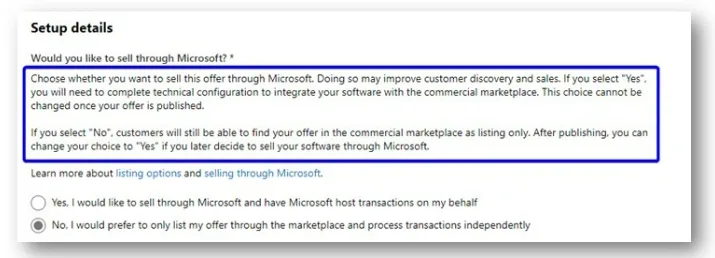
- On selecting Yes, you will get a message to complete the Technical Configuration to integrate the offer with the commercial marketplace This choice cannot be changed once the offer is published. Complete the Technical Configuration and create a pricing plan (SKU’s) for the offer.
Create new Transactable SaaS offers from scratch
If you want to keep your Contact Me Offer as it is and create a new transactable offer, simply follow the steps mentioned in this detailed guide Create Transcatable SaaS offers in the commercial marketplace | Microsoft Docs
In creating Transactable SaaS offers, there are two major activities that you need to focus on i.e., Technical Configuration and Creating a pricing plan.
What is Technical Configuration?
On the Technical configuration tab, you need to define the technical details which the commercial marketplace will communicate to their SaaS application or solution. Here are a few steps that are important for technical configuration:
- Landing page URL– Define the SaaS website URL (for example: https://contoso.com/signup) that customers will land on after purchasing the offer from the Azure Marketplace and triggering the configuration process from the newly created SaaS subscription.
- Connection webhook – For all asynchronous events that Microsoft needs to send to you (for example, SaaS subscription has been cancelled), you must provide a connection webhook URL. Microsoft calls this URL to notify you of the event.
- Azure Active Directory tenant ID- Mention your Tenant ID
- Azure Active Directory application ID- Mention your Application ID
Pricing Plans:
Once you have updated the technical configuration for the offer, you need to the define the pricing plans for the same You can have different pricing plans based on different SKUs of the offer. For example: You can have plans with Basic, Standard, or Premium SKUs with distinctive features and pricing associated with them.
With Transactable SaaS Offers, you have the opportunity to expand your reach to 141 different countries, out of which 55 countries are Microsoft Tax Remitted (i.e., Microsoft assumes responsibility for managing End Customer Taxation, including calculating, collecting and/or remitting certain taxes.).
Pricing model:
There are two types of Pricing models that are currently supported for transactable SaaS Offers:
- Flat rate
- Per User
Your plans can either have Flat Rate or Per User pricing model.
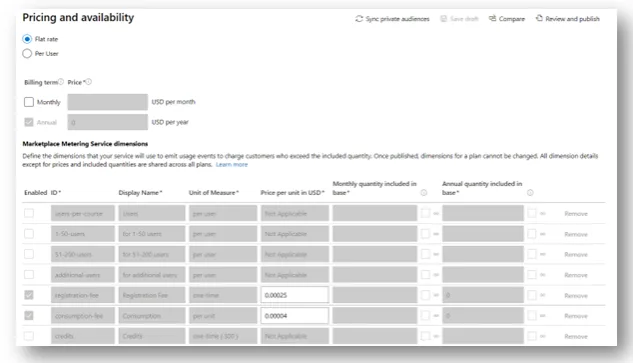
With the Flat Rate pricing model, you get flexibility to choose the billing terms (Monthly, Annual) and define Metering Dimensions (Additional usages). For Example: you can have additional usages such as, Registration Fee, Consumption Fee, Setup Fee, etc., that you can levy in addition to the Recurring Monthly or Annual charges. Please refer to the screenshot below:
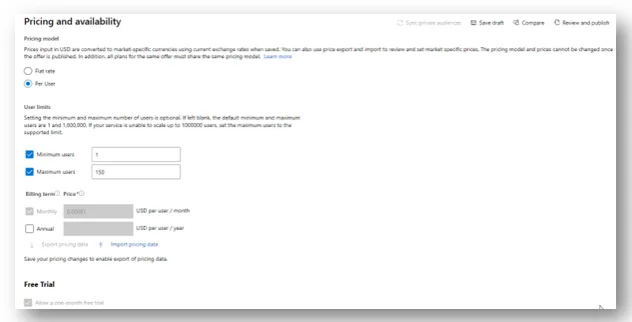
If you prefer to charge your customer separately for each use, you can make use of the Per User pricing model in which you can define the pricing for the plans in Monthly or Annual billing terms for each user. Additional usage (Metering Service Dimensions) is not supported for Per User pricing model. Please refer to the screenshot below:
Note: All plans for an offer must use the same pricing model.
Plan Visibility:
In the Microsoft Commercial Marketplace, you have the choice to either make your offers visible to everyone in the selected region/countries with Public Plans or you can limit the visibility of your plan to selected audiences using Private Plans.
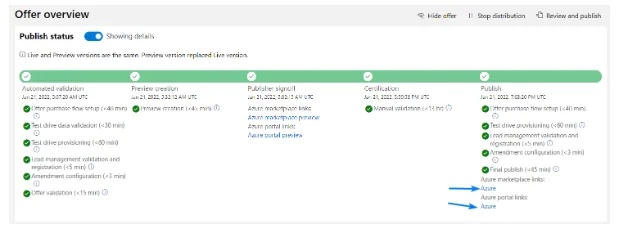
Once you update all the requisite details, you can go ahead and publish the offer in Partner Center. The offer goes through different publishing phases such as:
- Automated Validation
- Preview Creation
- Publisher signoff
- Certification
- Publish
You can view the publishing status of the offer on the Offer Overview page in Partner Center as shown below:
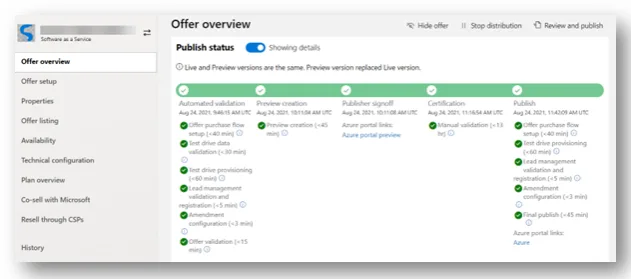
Once your offer is successfully published as shown in the image below, there will be a link for either AppSource, Azure Marketplace, or both depending on the options you selected while creating your offer.